

For any media inquiries, please send us an email and we will get back to you as soon as possible.
This release delivers significant user experience upgrades to the workspace interface, a more efficient schedule and data-tagging pipeline in Build, and critical infrastructure stability enhancements for Gateway deployments.
This update focuses on making operational workspaces more responsive, interactive, and efficient. By redesigning the Control Tile with priority handling, introducing Live Mode bandwidth protections, adding an Equipment Filter, and unlocking Copy/Paste layout cloning, operators can navigate, command, and build workspaces with significantly fewer clicks and zero clutter.
New Control Tile with Layouts, Performance Improvements
Enhanced the Control Tile priority experience with improved value handling, clearer editing workflows and better reliability. Updates include smarter priority initialization, enforced slider limits with visible ranges, draft change highlighting, conditional relinquish controls, ability to set default relinquish values, improved pending-state behavior, stronger synchronization between API and MQTT updates, a redesigned priority selection interface with larger click targets and refined hover interactions, and overall layout and spacing optimizations for a cleaner, more responsive UI.
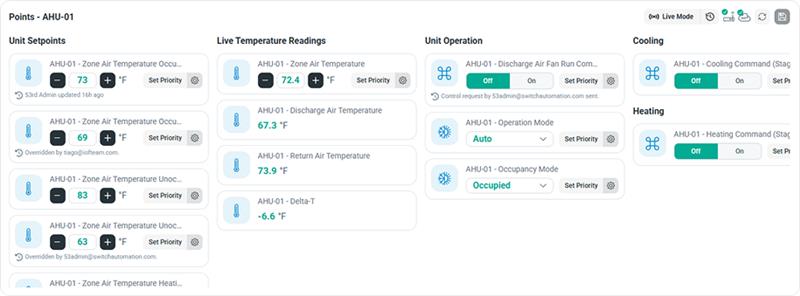
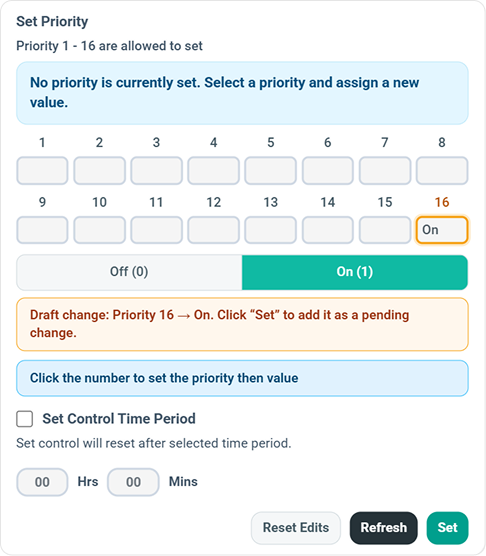
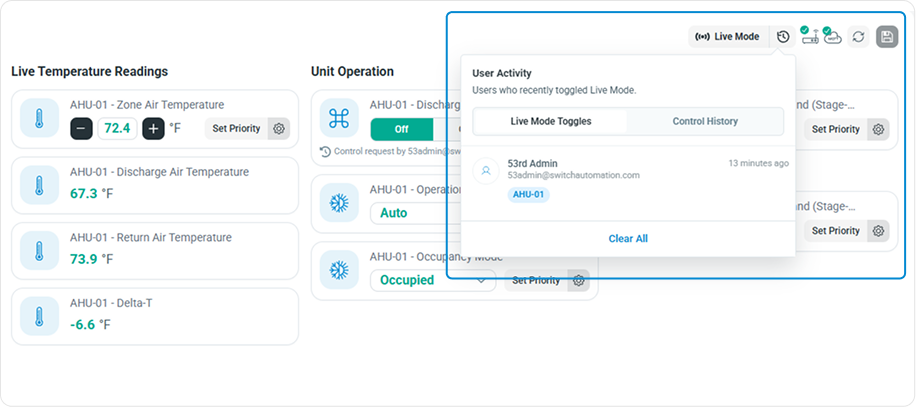
Control tile Live mode history and max minutes
Added live mode history with a configurable maximum live mode duration, allowing live updates to remain active only for the specified number of minutes before automatically exiting live mode to optimize performance and bandwidth.
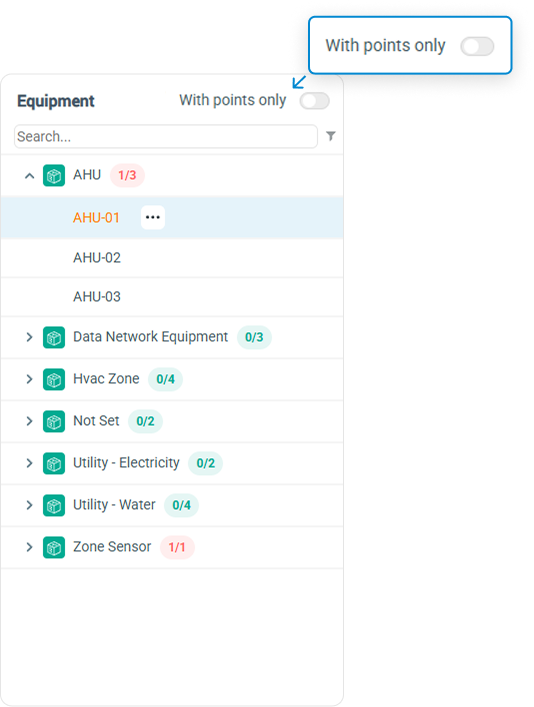
Equipment Tile with Points only option
Added a "With Points Only" toggle to filter the equipment list, displaying only equipment that contains points for quicker navigation and reduced visual clutter.
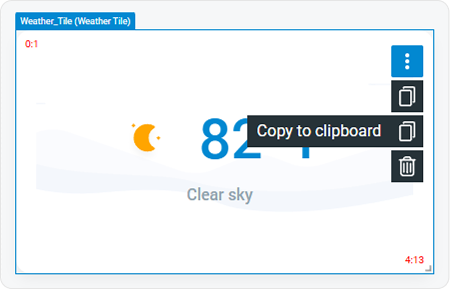
Copy/Paste Tiles
Added the ability to copy and paste tiles, making it faster to replicate workspace layouts or reuse tile configurations across different pages, reducing repetitive setup effort.
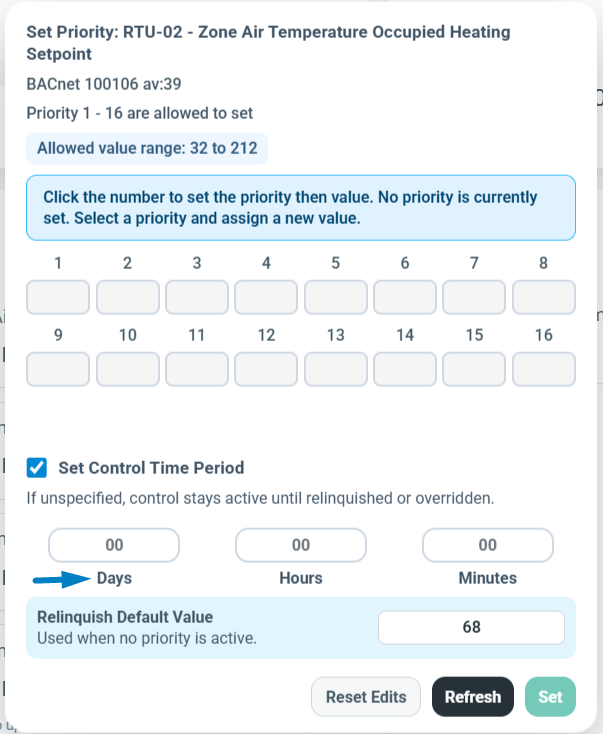
Control Days Option
Introduces the ability to select specific days of the week when a control command or schedule should be active.
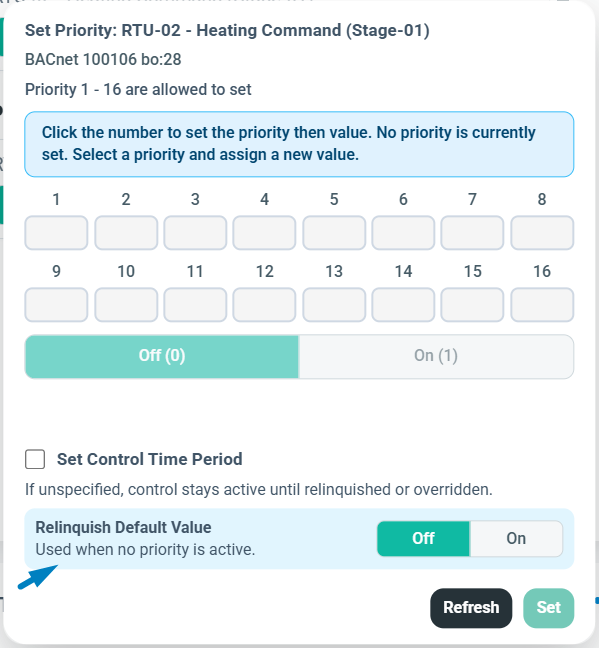
Control Default Relinquish
Allows users to set a default relinquish value directly on a sensor. When an active override or command is cleared, the sensor automatically falls back to this predefined baseline state, ensuring predictable operational behavior and safer default controls.
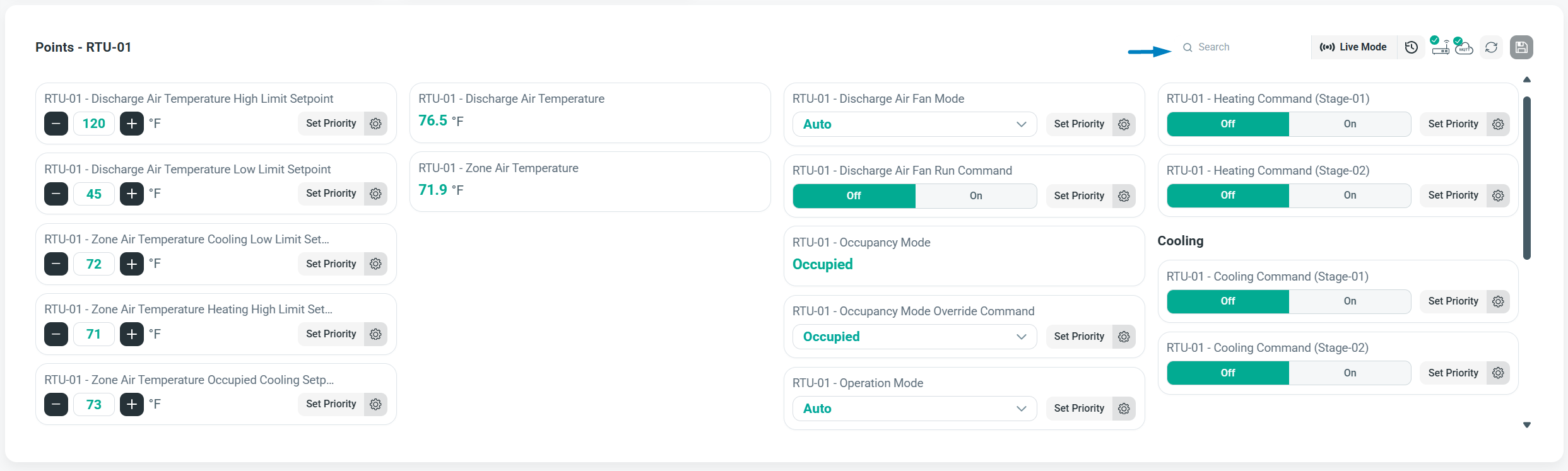
Control Tile Filter
Introduces dedicated filtering controls within tiles, allowing users to quickly search, isolate, and view specific control points.
This update enhances data transparency and readability across your charts and sensor views by introducing real-time Sensor Health tracking. Users can now instantly check point health directly in graph hover tooltips, view exact arrival timestamps instead of forced 15-minute intervals, and values presented in real operational terms (such as ON/OFF) instead of raw numerical values (1 or 0) for immediate operational clarity.
Sensor State
Provides real-time visibility into the operational status of your data points, instantly showing whether a sensor is healthy or experiencing an issue. Additionally, hovering over data points on a graph now displays a dedicated Health status directly inside the tooltip for quick troubleshooting.
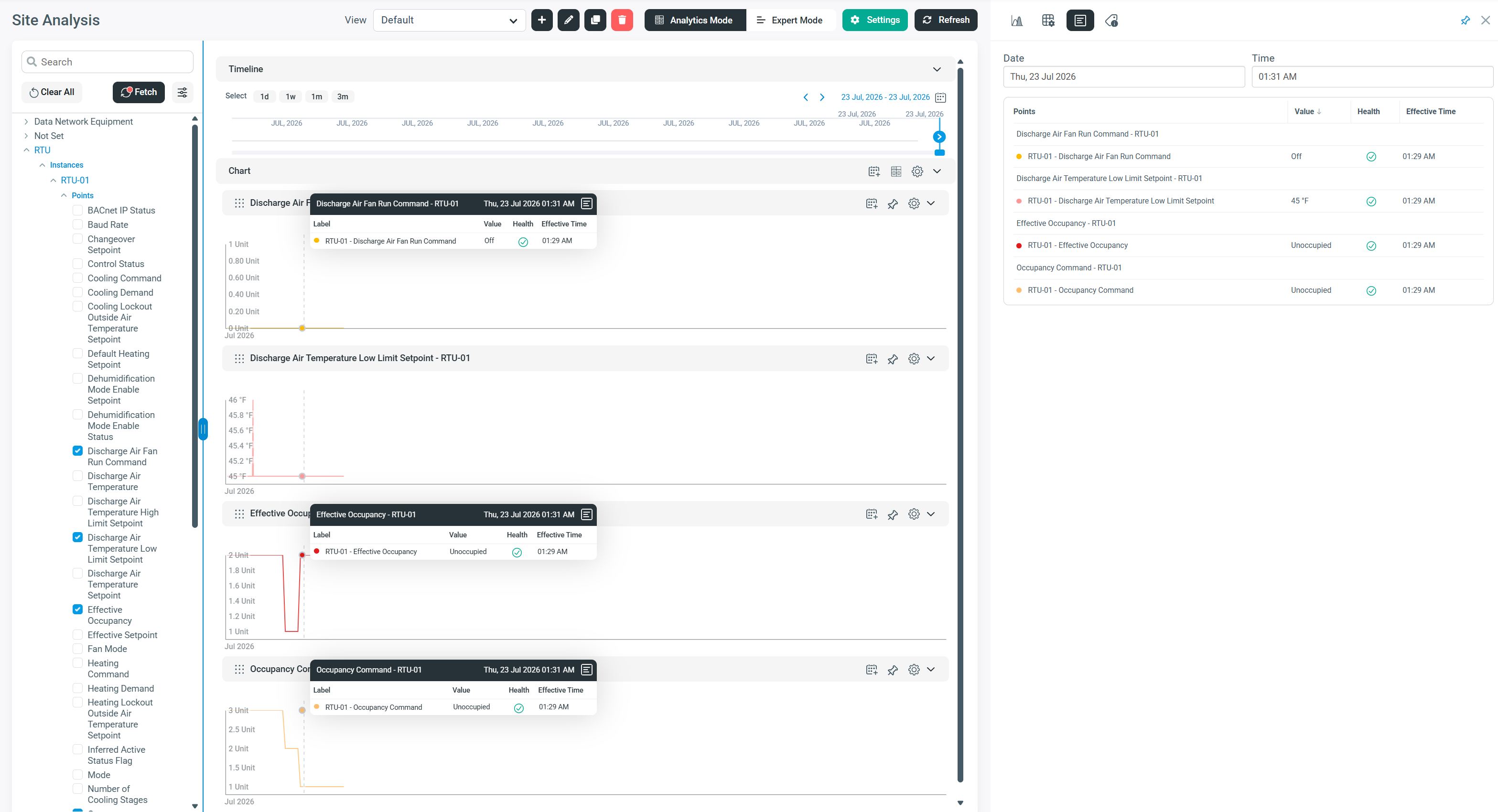
Effective time & Human-Readable Values
Sensor readings now display the exact moment a data point is recorded, rather than forcing readings into rigid 1-minute intervals, preserving true timestamp accuracy. Additionally, values are now presented in real operational terms (such as ON/OFF) instead of raw numerical values (1 or 0), making live data and historical charts immediately clearer and easier to read at a glance.
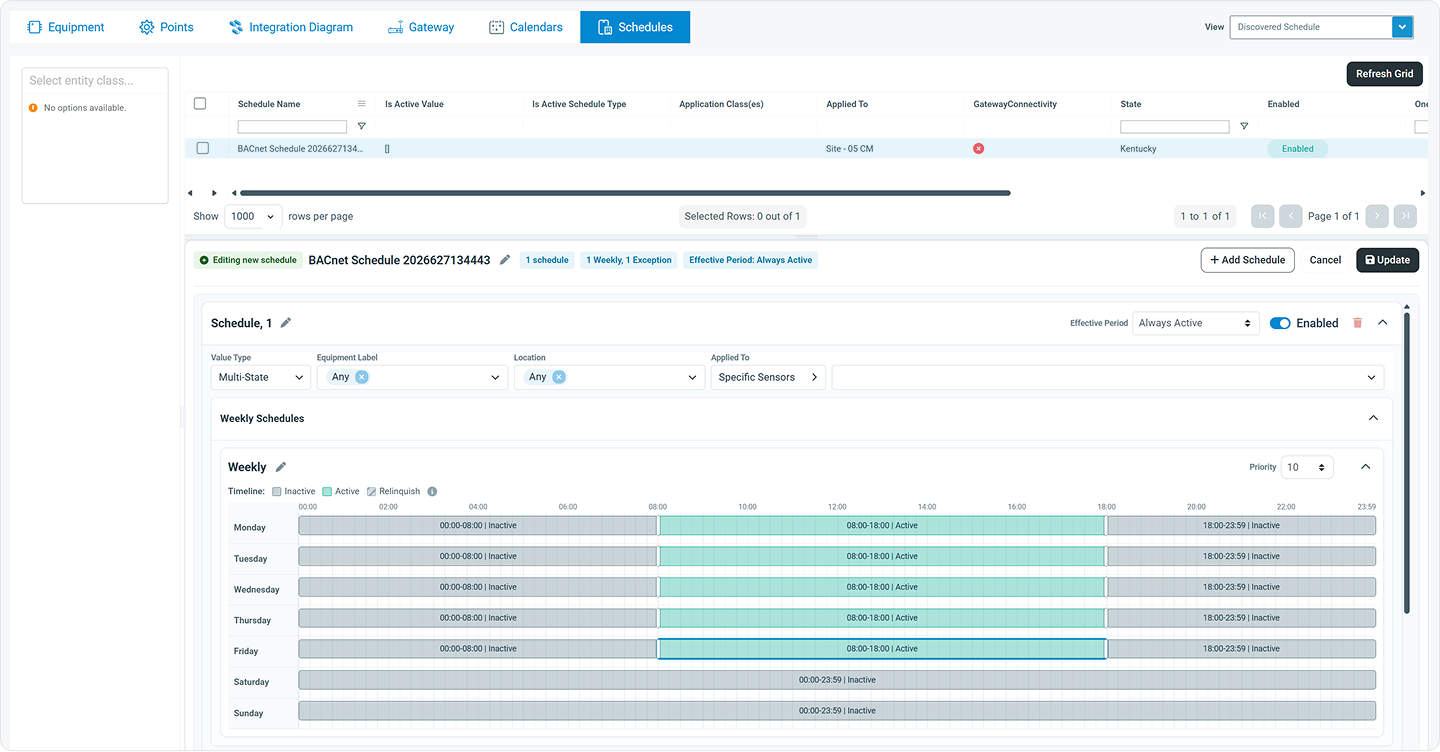
Configuration workflows will receive a massive efficiency boost in this release. Schedule management is now cleaner and centralized into a Single Timeline View, while a brand-new Reusable Calendar Management system simplifies holiday and exception scheduling across multiple BACnet devices and sites. Additionally, data mapping is accelerated via a direct Airtable sync for point-tagging predictions.
Schedules Main Timeline View
Streamlined Schedule Interface. Retires the right side panel for schedules to declutter the workspace layout. Schedule management will now be maintained solely through the main schedule timeline view.
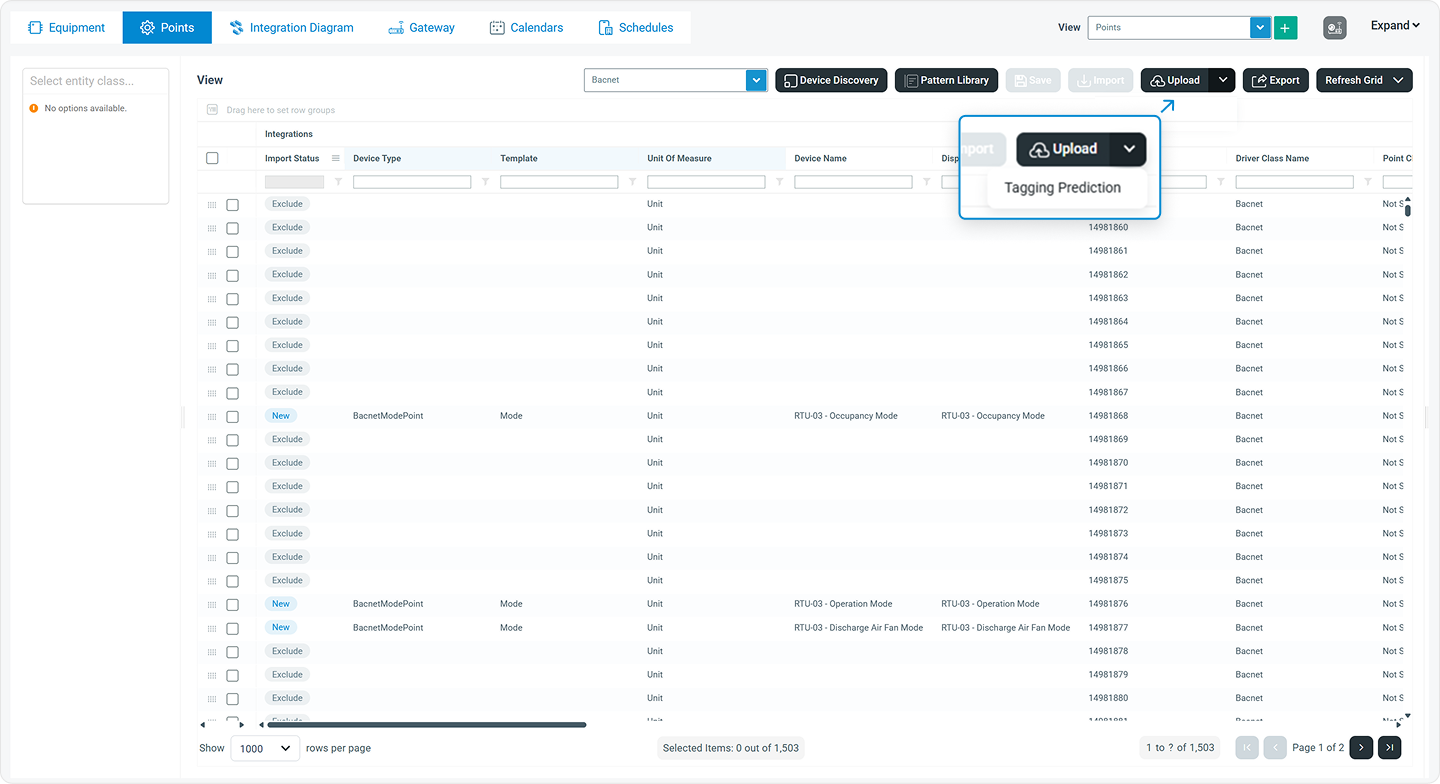
Automated Point Selection - Tagging Prediction
Added the ability to update point tagging predictions directly from Airtable, making it easier to review, refine, and synchronize predicted tags.
This update introduces critical stability fixes and delivery enhancements to automated email alerts, ensuring sensor updates and system conditions are communicated clearly, reliably, and without delay.
Notifications
Backend optimizations prevent latency and delivery gaps, ensuring time-sensitive sensor alerts reach your inbox reliably.
Under-the-hood infrastructure upgrades significantly improve deployment flexibility and communication efficiency. This includes optimized BACnet stability, a drastic reduction in network bandwidth usage, and expanded hardware support that bridges the gap between legacy deployments and the latest portfolio-scale appliance deployments.
Bacnet Improvements for Schedule and Live Mode
Enhanced BACnet gateway support with improved schedule handling, more reliable live mode synchronization, and overall communication stability.
Bandwidth Improvements
Optimized data transfer and communication efficiency to reduce bandwidth usage while maintaining responsive system performance.
Expanded Legacy Compatibility
Added support for installing the application across legacy deployments, ensuring smoother implementation and seamless compatibility with existing infrastructure.
Dx3 available on new Portfolio style Appliance
Added support for deploying and running Dx3 on the new Portfolio sites, ensuring compatibility with the latest hardware platform.
A comprehensive sweep of general system fixes aimed at eliminating minor glitches, improving stability, and ensuring a smoother overall user experience.
The table below contains all fixes and improvements included in Version 7.32.0. Use search, filters or sorting to find items relevant to your team.

5 articles found
Latest updates to the Switch Platform released 28 September 2026 (Version 7.34.0)
Latest updates to the Switch Platform that will be released 28 September 2026 (Version 7.34.0)
Latest updates to the Switch Platform released 23 July 2026 (Version 7.32.0)
Latest updates to the Switch Platform that will be released 23 July 2026 (Version 7.32.0)
Latest updates to the Switch Platform released 10 June 2026 (Version 7.31.0)
Latest updates to the Switch Platform released 21 May 2026 (Version 7.30.0)
Latest updates to the Switch Platform released 22 January 2026 (Version 7.29.0)
Latest updates to the Switch Platform released 08 December 2025 (Version 7.28.0)
Latest updates to the Switch Platform released 20 October 2025 (Version 7.27.0)
Latest updates to the Switch Platform released 26 September 2025 (Version 7.26.1)
Latest updates to the Switch Platform released 11 September 2025 (Version 7.26.0)
Latest updates to the Switch Platform released 5 Mar 2024 (Version 7.16.0)
Latest updates to the Switch Platform released 18 January 2024 (Version 7.15.0)
Latest updates to the Switch Platform released 3 September 2023 (Version 7.12.0)
Latest updates to the Switch Platform released 11 August 2023 (Version 7.11.0)
Latest updates to the Switch Platform released 30 May 2023 (Version 7.10.0)
Latest updates to the Switch Platform released 5 May 2023 (Version 7.9.0)
Book a demo and see how Switch connects, analyzes, and optimizes your buildings from day one.


